
I started looking into Jev after seeing it used across a few different examples. The json-render + Jev demo from Vercel Labs made me really curious about Jev. Since Jev itself is only making bounded decisions over prepared candidates, I wanted to understand where that speedup comes from and which part of the UI generation pipeline it actually changes.
A lot of AI calls inside applications do not need open ended generation. In many cases, the application already knows the possible outcomes, and the harder part is deciding which one fits the information available at that moment.
For example, a support system may need to route a ticket to one of several teams, while a coding agent may need to choose its next tool or action. The same idea applies to generative UI, where the available components may already be defined and the model only needs to decide which ones fit the current request.
What a Decision Model Actually Does
A decision model is useful when the application already knows the possible outcomes, but choosing between them still requires interpreting some information.
In Jev, that information is called the state. The state is evaluated together with the questions that define what Jev should decide. TypeSafe describes it as:
State is the content you ask a System One model to evaluate. It could be a support message, a passage of text, or the current state of your application. You pass it in the
statefield of an API request, alongside the questions you want answered.https://docs.typesafe.ai/concepts/state (opens in a new tab)
Jev returns decisions based on that state, while the application still controls what those decisions can be and what happens with the result afterward.
For example, an application may define several possible routes for a support ticket, a set of tools an agent is allowed to call, or a list of components that can be used to build an interface. The decision model evaluates the current state and chooses between those possibilities.
The application also remains in control after the decision. It can accept the result, apply a confidence threshold, send the case for review, pass it to another model, or ignore it completely. A routing decision may select another worker, while a score may affect priority or decide whether another step should run.
This also gives decision models an important boundary. Permissions, database values, exit codes, calculations, and other facts that already have an authoritative answer should still come directly from their source. A decision model becomes useful when the difficult part is interpreting the available information rather than retrieving or calculating something that is already known.
How Jev Works as a Decision Model
Jev is TypeSafe AI’s first public System One model (opens in a new tab). System One Models are built to make structured decisions quickly, with outputs that software can use directly.
TypeSafe says the System One name was inspired by Daniel Kahneman’s Thinking, Fast and Slow (opens in a new tab), which describes System 1 as fast and intuitive thinking and System 2 as slower reasoning. Jev itself is named after the economist William Stanley Jevons.
TypeSafe uses this idea for models that focus on decisions such as classification, routing, scoring, and verification instead of generating long responses.
A request gives Jev the state (opens in a new tab) together with one or more questions. The questions define what Jev is allowed to answer, and the response contains typed decisions with probability information that application code can use directly. Jev exposes three question types for this: Choice, Noul, and Score, which I will go through in the next section.
This keeps the possible outputs under the application’s control. Jev can choose between known options, estimate the probability of a yes or no answer, or evaluate something against a defined scale. The application then decides what happens with those results.
Jev also has a clear limit around generation. Writing a customer reply, explaining a result, or generating a code patch still needs a general-purpose LLM or another part of the application. Its current inputs are text based as well, so an image or audio recording needs to be converted into suitable text or structured data before Jev can evaluate it.
How Jev Differs from Structured Outputs
General-purpose LLMs can already return schema-constrained responses through features such as structured outputs (opens in a new tab), so returning valid JSON is already possible without Jev.
The difference goes deeper than the output format.A general-purpose LLM still uses autoregressive generation, generating tokens sequentially while following the requested schema. Jev is designed around the decision itself. The possible outputs are defined in advance, and its architecture and training are focused on returning those decisions together with probabilities. TypeSafe also describes its sampling as parallel instead of generating the output one token at a time. They describe the approach like this:
We built a new stack entirely focused on automation: with a new model architecture, parallel sampler for maximum efficiency, and training method we call Reinforcement Learning for Calibrated Decisions (RLCD).
Our first public model is Jev, available today in early access. Jev achieves similar levels of intelligence on System One tasks compared to existing LLMs, while being two orders of magnitude faster and more efficient. While Jev gives up string generation, it’s optimized for structured outputs and can’t hallucinate.
https://typesafe.ai/blog/introducing-system-one-models-and-jev (opens in a new tab)
There is an important detail behind the last claim. TypeSafe says Jev avoids hallucinations by always returning an answer that matches the structure and possible options defined in the request. This means Jev cannot invent another output outside those options. It can still choose a valid option that is wrong, so this does not mean every Jev decision is correct!
The training approach behind these decisions is called Reinforcement Learning for Calibrated Decisions (RLCD). TypeSafe defines it as:
Reinforcement learning for calibrated decisions trains TypeSafe to return decisions and calibrated probabilities instead of generated text.
Calibration describes how well those probabilities match what actually happens across many examples. For example, if a group of comparable predictions receives a probability around 0.8, the predicted outcome should happen roughly 80% of the time when those probabilities are well calibrated.
This is still something I would evaluate using the application’s own data. The model may behave differently depending on the state it receives, the way the questions are written, and the type of decisions being made.
Jev as a Decision Layer
A useful way to place Jev inside an application is to separate generation, decisions, and execution.
- A general-purpose LLM can handle open ended work such as writing, planning, explaining, or generating code…
- Jev can handle bounded decisions such as choosing an option, checking whether something is true, or scoring something against defined criteria…
- Normal code can validate the result, enforce permissions, update state, and execute the final action…
So simply put, a general-purpose LLM generates, Jev decides, and normal code executes.
This becomes useful in systems that already use general-purpose LLMs. Many model calls inside an agent do not need to generate something for a person to read. The agent may only need to decide which tool should run next, whether enough information has been collected, which worker should receive a task, or whether a result needs review.
The available options can also depend on the current application state. For example, a browser agent could build its options from the interactive elements currently available on the page, while a coding agent could choose from actions such as searching the repository, running tests, or asking for more context… The same idea can be used for model routing, where the available options are the models that can handle the current request.
Jev can also sit before a general-purpose LLM. A smaller decision can be attempted first, then a result with too much uncertainty can be passed to the larger model or to a person. This keeps the more expensive or slower model for cases that actually need it.
For an existing system, Jev does not need to control the workflow from the beginning either. It can first run on the same inputs as the current decision path while both results are recorded. This kind of rollout is often called shadow mode. The disagreements then become real examples that can be reviewed before Jev is allowed to affect the workflow.
Larger judgments can also be split into smaller questions. Each question can focus on one part of the problem while the final rule stays in application code. Independent questions about the same state can also be evaluated together, which I will come back to later when looking at shared state and multiple questions.
I also found this pattern in this workflow example (opens in a new tab) and another Jev example (opens in a new tab), where Jev is used for bounded decisions inside larger AI workflows.
The Three Question Types in Jev
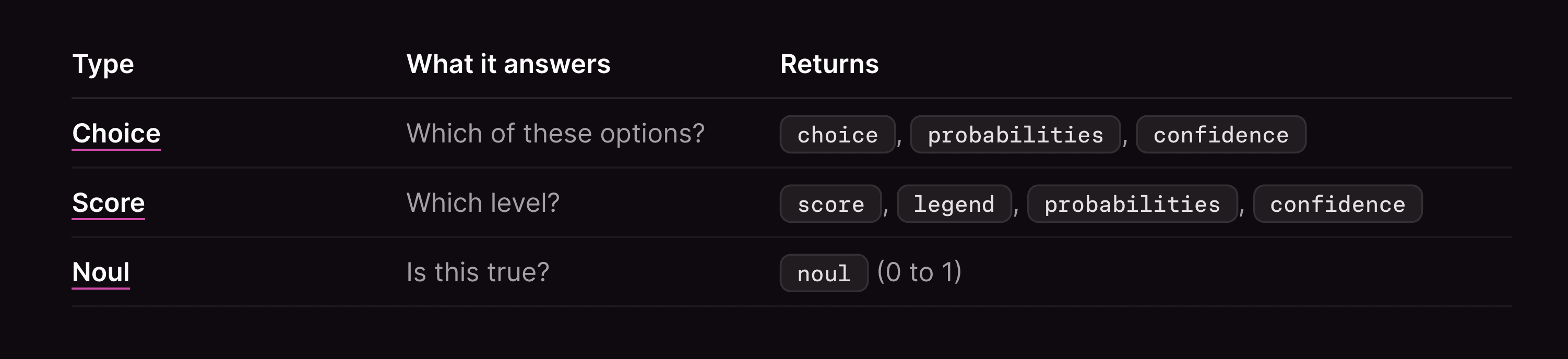
Jev has three question types, they are Choice, Noul, and Score. TypeSafe also calls them primitives. Each one represents a different kind of decision, so the question type depends on what the application needs to get back from Jev.
Choice is used when one option must be selected from a known set. Noul is used for a boolean question and returns the probability of yes. Score is used when the answer belongs somewhere on an ordered scale.
Choice primitive
Choice is used when the possible answers are already known and Jev needs to select one of them. The application provides the available options together with the state, then Jev evaluates which option fits that state best.
The image below shows this flow. Jev receives the state and a known set of options, then returns the selected option together with the probability for every option and a separate confidence value.
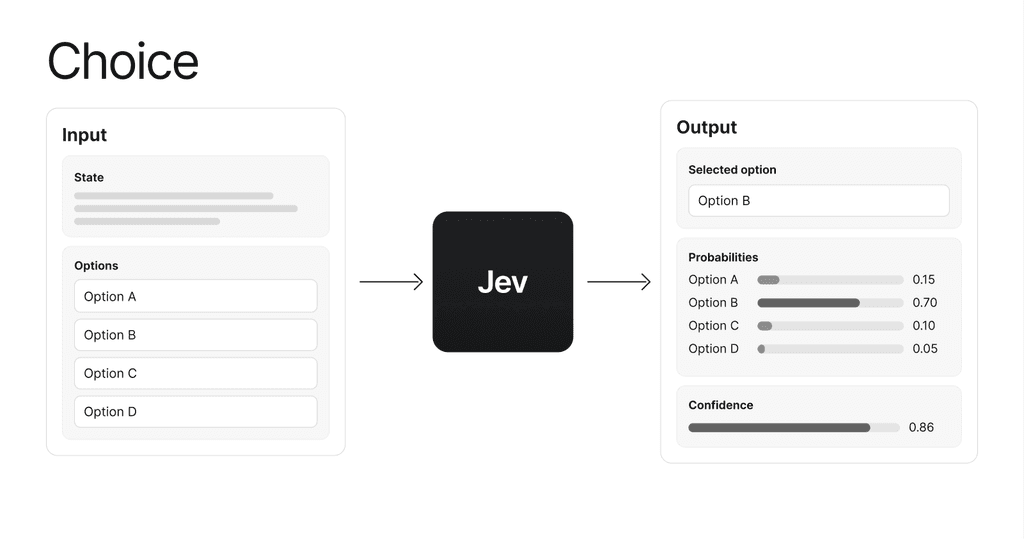
The probabilities are useful because the selected answer alone does not show how the other options compared. One option may clearly stand out, while in another request the probability may be spread across several options.
The possible answers should also cover cases where none of the main options fit. TypeSafe recommends adding something like other or none of the above when this can happen, instead of forcing Jev to select an option that does not match the state. They mentioned this in choice documentation (opens in a new tab).
Noul primitive
Noul is used when the decision can be expressed as a boolean / yes or no. Instead of reducing the result immediately to true or false, Jev returns the probability that the answer is yes.
This one below shows the difference clearly. Jev receives the state and the yes or no question, then returns one value between 0 and 1.
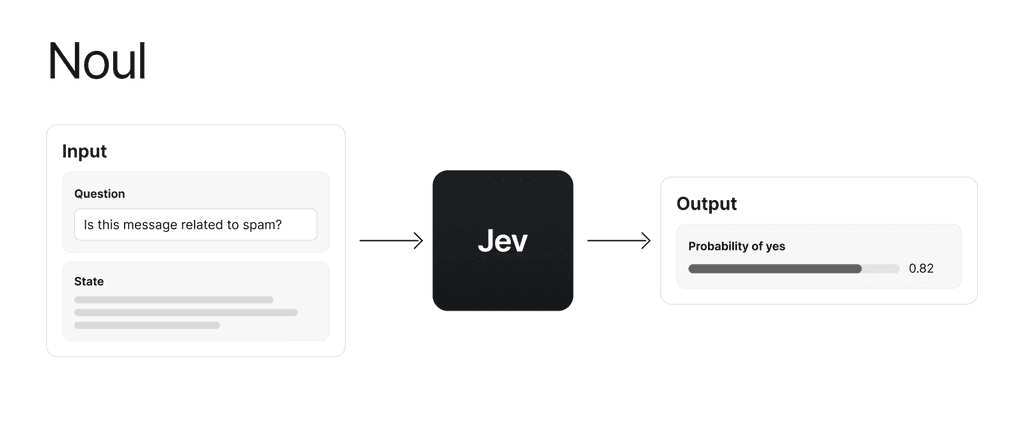
A value close to 1 points strongly toward yes, while a value close to 0 points strongly toward no. Therefore a value around 0.5 means the two possibilities are much closer.
One detail that is easy to misunderstand is that Noul does not return a separate confidence value. For example, 0.05 does not mean Jev has low confidence. It means Jev assigned only a 0.05 probability to yes, so the result points strongly toward no.
If yes and no need more exact definitions, Noul can also include criteria that describe what should count as true and what should count as false.
Score primitive
Score is used when the answer belongs somewhere on an ordered scale. The application defines the levels and describes what each one means, then Jev evaluates the state against that scale.
This is different from Choice because the options in a Choice do not need to have any order. With Score, every level represents a position on the same scale.
This image below uses severity as an example. The levels are ordered from 0 to 2, while the returned score can fall between those exact levels.
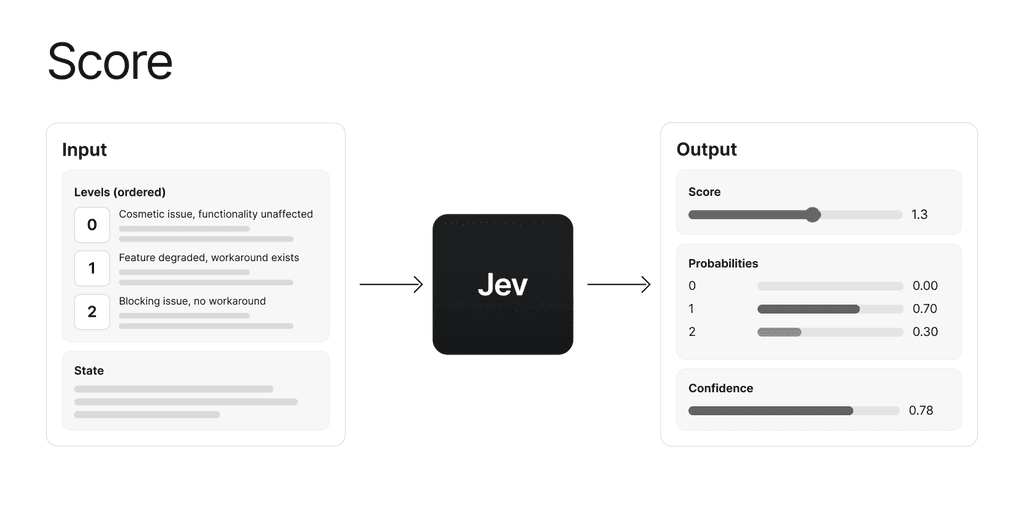
For example, if the probabilities are 0.0 for level 0, 0.7 for level 1, and 0.3 for level 2, the score becomes:
0 * 0.0 + 1 * 0.7 + 2 * 0.3 = 1.3So 1.3 means most of the probability is around level 1, with some probability on level 2. The response also includes the probability for every level, a confidence value, and a legend that maps the numbers back to their descriptions.
The descriptions of the levels matter here. Labels such as low, medium, and high leave too much meaning undefined. Describing what each level actually represents gives Jev a clearer scale to evaluate. TypeSafe also recommends keeping each Score focused on one thing instead of mixing several different factors into the same scale.
Reading Probabilities and Confidence
The question type tells us what kind of answer Jev returns, but the answer itself is only part of the response. Choice and Score also return probabilities and a confidence value, while Noul returns the probability that the answer is yes.
For a Choice, every available option receives a probability. If most of the probability goes to one option, the decision is clearer. If the probability is spread across several options, there is more uncertainty about which option fits best.
Score works in a similar way, but the probabilities are distributed across the ordered levels. The final score shows where the result sits on that scale, while the probabilities show how Jev distributed the result between the levels.
For Choice and Score, TypeSafe also returns confidence (opens in a new tab). Confidence is calculated from the complete probability distribution and gives one value between 0 and 1. A distribution that is concentrated around one answer produces higher confidence, while a more spread out distribution produces lower confidence.
This is different from the probability returned by Noul. A Noul value of 0.05 does not mean confidence is low. It means Jev assigned only a 0.05 probability to yes, so the result points strongly toward no. Noul does not return a separate confidence value.
Confidence should also not be read as accuracy. For example, confidence: 0.8 does not mean the answer is guaranteed to be correct 80% of the time. It describes how clear the decision is from the returned probability distribution. How often decisions with that confidence are actually correct still needs to be measured using real examples from the application.
This becomes useful when deciding what should happen next. A result with enough confidence may continue automatically, while a less clear result could ask for more information, be passed to another model, or be left for a person to review. TypeSafe describes this approach in its confidence routing pattern documentation (opens in a new tab).
The threshold itself still belongs to the application. There is no confidence value that works for every use case. A result that is only shown as extra information can usually accept more uncertainty than an action that changes data or causes something difficult to undo.
Using Multiple Questions with Shared State
A single Jev request can contain several questions that use the same state. This is useful when the same input contains enough information to make several different decisions.
TypeSafe shows this in its speculative fan-out pattern (opens in a new tab). In the example below, the support ticket is the shared state. Five different questions are sent with it in one request, and each question looks at the same ticket from a different angle.
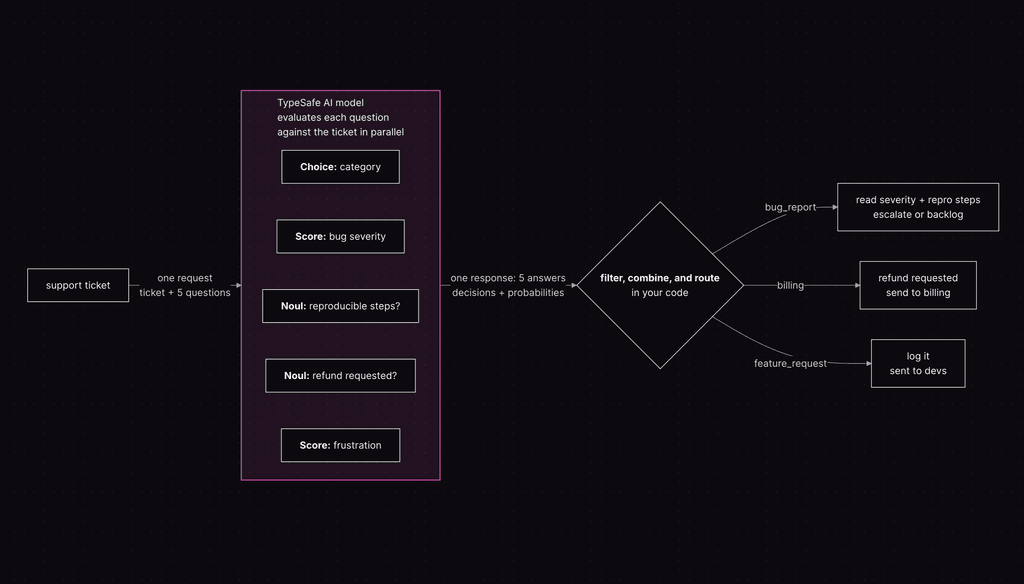
The diagram makes the pattern easier to see. One Choice question identifies the ticket category, while two Score questions evaluate bug severity and frustration. Two Noul questions check whether reproducible steps exist and whether a refund was requested. The model evaluates these questions against the same ticket in parallel, then returns the five answers with their probability information in one response.
What happens after that still belongs to normal application code. The example uses the returned category and the other decisions to filter, combine, and route the result. A bug report can use the severity and reproducible steps before deciding whether to escalate it or leave it in the backlog. A refund request can be sent to billing, while a feature request can be logged and sent to the developers.
This also shows why splitting a larger judgment into smaller questions can be useful. Instead of asking one question to understand the whole ticket and decide everything at once, each question focuses on one decision. The application can then decide which answers matter and how they should be combined.
Using the same state for several questions can also avoid sending that state again in separate requests. For example, suppose the state contains 2,000 tokens and ten questions each add another 100 tokens. Sending the questions separately would require roughly:
10 * (2,000 + 100) = 21,000 input tokensIf the state is sent once with all ten questions, the same example becomes roughly:
2,000 + (10 * 100) = 3,000 input tokensThese numbers only show how much repeated input can be avoided. They are not a latency benchmark because the actual request time still depends on the model, API, and workload.
The questions should also make sense with the same state. If several decisions can be made from the information already available, they can be evaluated together. If one decision first needs to fetch or produce new information, the state has changed and the next question belongs in a later request.
TypeSafe evaluates each question independently against the same state, meaning one answer does not become context for another. This is different from statistical independence. Two questions based on the same state may still be closely related, so their probabilities should not automatically be multiplied together.
How json-render + Jev Changes UI Generation
To understand the json-render + Jev demo, it helps to separate UI generation from rendering. json-render already supports progressively generated interfaces, so Jev is not making React or the browser render faster. It changes the composition step that produces the UI spec.
json-render uses a catalog to define the components and actions that AI is allowed to use. In its normal streaming flow, a general-purpose LLM generates a SpecStream, which is a stream of JSONL patches. json-render applies those patches as they arrive, so the spec grows progressively and the existing renderer can update the UI while generation is still happening.
The experimental Jev composer (opens in a new tab) changes that composition step. Instead of generating the spec as free-form output, the application prepares element candidates first. Those candidates can already contain the component type, concrete props, state bindings, allowed actions, and a description. Jev then decides which candidates should be included and how they should be arranged. json-render turns those decisions into a normal flat Spec that the existing renderer can use.
The two paths are slightly different:
- In the normal streaming path, the prompt and catalog go to a general-purpose LLM, which generates JSONL patches that progressively build the spec.
- With json-render + Jev, the application provides prepared candidates and Jev chooses which ones are needed. json-render then builds and validates the spec from those decisions before passing it to the same renderer.
The browser is still rendering the UI normally. Jev does not make React or the browser itself faster. The speed difference happens before rendering, during the composition step that creates the UI specification.
For a new UI, json-render uses batched composition by default. The first evaluation can select the root and the required components together, then json-render immediately produces a validated preview. A second evaluation handles the parent, slot, and order of those elements when layout decisions are needed. A simple tree may not need that second layout evaluation at all. This avoids making one network request for every component.
That helps explain the difference shown in the demo. In the recorded example, the default SpecStream / JSONL version showed around 1.57s to first render and 2.49s total, while the Jev version showed around 0.87s to first render and 0.90s total.
These numbers are from that particular demo and should not be treated as a general benchmark. The useful part is understanding why the difference can happen. The normal path still depends on a general-purpose LLM generating JSONL patches token by token, even though json-render can render those patches progressively. With Jev, the possible elements are already prepared and several selection decisions can be made together, which can reduce the amount of generative work needed before a useful spec is available.
There is also an important limitation. A catalog by itself is not enough for the Jev composer because Jev does not generate missing open ended strings or data. Values still need to come from prepared candidates, application records, localized content, form definitions, or another model.
This is what made the json-render + Jev example useful for understanding Jev. Jev is not rendering the interface. It replaces part of the composition work, while json-render and the application still own the spec, components, validation, actions, data, and rendering.
Example: Classifying CI Failures with Jev
CI failures are a useful example because the pass or fail result should remain deterministic, while understanding why a failed job failed can require interpreting logs and code changes. In this example, Jev only handles that interpretation.
Three questions are used in this example:
Choice: What kind of failure happened?Noul: Did the current change cause it?Score: How clearly does the available output identify the cause?
The complete example is available in the jev-ci-classifier repo (opens in a new tab). It can be run locally and is also connected to GitHub Actions so the decisions can be tested with real pull request failures.
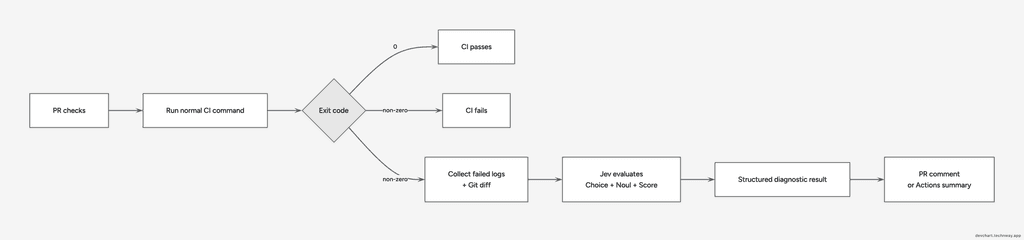
The normal CI command still decides whether the PR passes or fails. Jev only adds structured information about the failure that the application can use afterward.
At the time I tested this, direct access through TypeSafe was still behind a waitlist, but Jev was also available through other providers.
Vercel added Jev to AI Gateway, and announced a temporary promotion where Jev is free through AI Gateway (opens in a new tab) until September 25, 2026.
For my example, I ended up using OpenRouter instead :D. That is the version I tested locally and through the real GitHub PR workflow, so the rest of this example uses its API.
OpenRouter exposes Jev through its Decisions API. When I tested it, typesafe/jev-1.13 was listed at $0.042 per million input tokens with no output token cost.
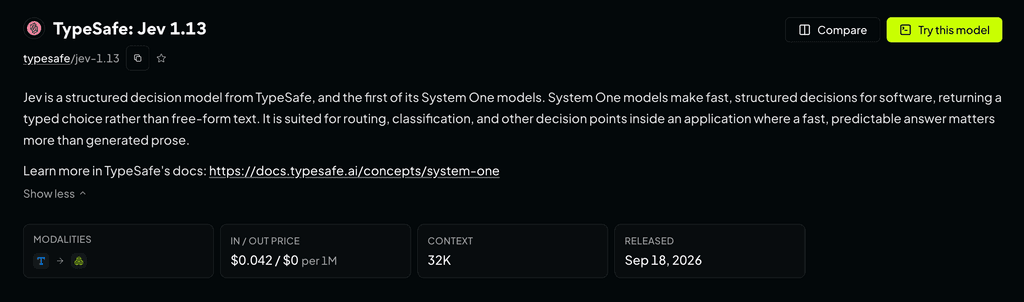
There is also a naming difference worth knowing. Vercel’s AI SDK calls the yes or no question boolean, while the Jev API used through OpenRouter calls it noul. Both represent the probability that the answer is yes.
For example:
type: 'boolean'through Vercel represents the same kind of decision as:
type: 'noul'in the Jev API used through OpenRouter.
Defining the Decisions
The first question classifies the failure into one of a known set of categories:
failure_category: {
  type: 'choice',
  instructions:
    'Identify the primary cause of this CI job failure. The job runs lint, then type checking, then the test suite, and stops at the first failing step.',
  criteria: {
    lint_failure: 'ESLint reported a rule violation.',
    type_failure:
      'The TypeScript compiler reported a type error or a syntax error.',
    test_failure:
      'A test assertion failed, or the test runner could not execute the suite.',
    dependency_failure:
      'A dependency could not be resolved or loaded while running the checks.',
    ci_environment_failure:
      'The runner, the network, or an external service failed, rather than the code under test.',
    unknown:
      'The available information is not enough to identify the primary cause.',
  },
},A Choice fits here because the application already knows the possible categories. Jev only needs to decide which one best matches the available information.
The second question checks whether the failure appears to come from the current code change:
change_related: {
  type: 'noul',
  instructions: 'The edits shown under change.diff caused this CI failure.',
  criteria: {
    true: 'The failure can reasonably be explained by the changes shown in change.diff, including indirect effects in unchanged files.',
    false:
      'The available evidence suggests the failure is unrelated to the changes shown in change.diff or was already present.',
  },
},This question became more useful after the actual Git diff was added to the state. Changed file names alone do not always give enough information. A changed source file may break a test in another file, so the relationship is much clearer when the model can see what was actually changed.
The last question measures how clear the failure output is:
diagnostic_clarity: {
  type: 'score',
  instructions:
    'How clearly does the captured output identify the cause of this CI failure?',
  criteria: [
    'The output only reports that a step failed without identifying a file, rule, assertion, or error location.',
    'The output identifies a file, rule, or assertion, but does not provide a line number or concrete mismatch.',
    'The output provides a line number or a concrete expected-versus-actual mismatch.',
  ],
},The levels were intentionally written so the same log should not clearly match several levels. If the levels overlap too much, the probability can be split between them and the score becomes less useful.
Building the State
All three questions use the same state, following the shared-state pattern described earlier.
A simplified state looks like this:
{
  "job": {
    "name": "quality",
    "command": "pnpm check",
    "exit_code": 1
  },
  "change": {
    "changed_files": ["example/cart.ts"],
    "diff": "..."
  },
  "logs": "..."
}
What goes into the state matters. A complete CI log can contain thousands of lines that have nothing to do with the failure, so the workflow only sends the part that is likely to help with the decision.
In the tested workflow, only the last part of the failed command output is included. The logs are limited to 200 lines and 16 KB, while the Git diff is limited to 8 KB. The lockfile is excluded from the diff because it would add a large amount of unrelated content.
This keeps the state focused around the decision being made.
NOTE: The state can also contain source code or CI logs, so secrets and other sensitive values should be removed before sending it to an external model provider!
Calling Jev Through OpenRouter
The HTTP request is handled in postDecisions:
async function postDecisions(apiKey: string, body: string): Promise<Response> {
  try {
    return await fetch(OPENROUTER_URL, {
      method: 'POST',
      headers: {
        Authorization: `Bearer ${apiKey}`,
        'Content-Type': 'application/json',
      },
      body,
      signal: AbortSignal.timeout(REQUEST_TIMEOUT_MS),
    });
  } catch (cause) {
    // fetch throws on network errors and timeouts. Add the endpoint to make the error easier to diagnose.
    const reason = cause instanceof Error ? cause.message : String(cause);
    throw new Error(`The Jev request to ${OPENROUTER_URL} failed: ${reason}`, {
      cause,
    });
  }
}Before this request, the model, state, and questions are serialized together:
const body = JSON.stringify({ model: MODEL, state, questions });The request sends the CI state once together with all three questions. Jev can therefore return the failure category, change relationship, and diagnostic clarity in the same response.
This is the same shared-state pattern covered earlier, now used in the real CI example.
For example, the Noul answer can stay as a probability:
{
  "probability": 0.97
}instead of immediately being converted into:
{
  "causedByChange": true
}Keeping the probability gives the application more control. A result can be shown to a developer even when it is uncertain, while an automated action could require a much stronger value before doing anything.
Testing with Real CI Failures
The classifier was also tested in actual GitHub Actions runs using intentionally introduced PR failures instead of relying only on mocked responses.
In the first test, this working calculation:
return price * quantity;was changed to:
return price * (quantity - 1);which caused the existing test to fail.
Test Failure in PR #2
In PR #2 (opens in a new tab), Jev returned:
Category: test_failure
Confidence: 1

Caused by this change: 0.97

Diagnostic clarity: 2
Confidence: 1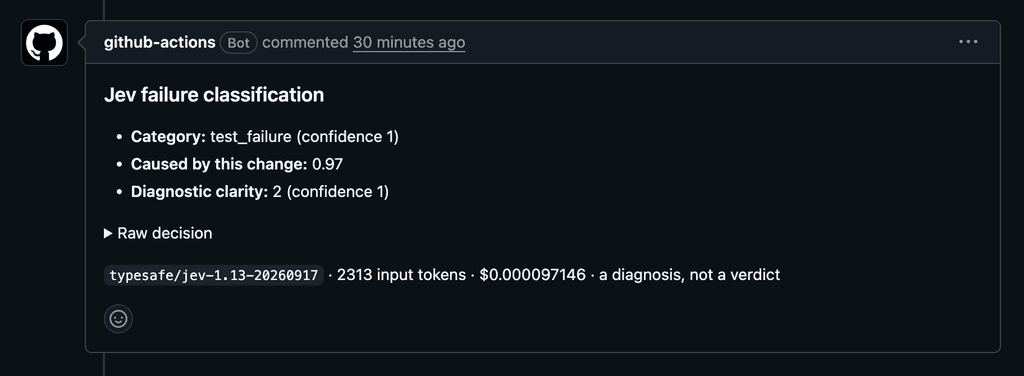
The result matches the failure that was introduced. Jev classified it as test_failure, gave 0.97 probability that the current change caused it, and returned the highest diagnostic clarity level because the test output contained a concrete mismatch.
A confidence of 1 for the Choice and Score results means their returned distributions were fully concentrated for those decisions. It still does not guarantee that the decisions are always correct.
These values become useful when each one is connected to a simple action in the application. For example, like this:
test_failure tells the application what kind of problem happened. That can be used to show test related information, route the failure to test specific handling, or group similar failures together.
0.97 for change_related tells the application how strongly Jev connects the failure to the current code change. The application can choose its own threshold. For example, a value above 0.9 could be shown as “probably caused by this PR”, while a lower value could be treated as uncertain and left for a developer to check… The 0.97 value itself should not be read as a guarantee of 97% correctness.
The clarity score tells the application how useful the available logs are for understanding the problem. In this example, 2 is the highest level, so the logs already contain a concrete location or mismatch. A lower score could be used to request more logs, keep the result less specific, or avoid taking an automated action when the cause is still unclear.
Together, the three results answer different parts of the failure: what failed, whether the current change probably caused it, and how much useful diagnostic information is available. The application can then decide what to show or what action to take.
TypeScript Failure in PR #3 (opens in a new tab)
A second test introduced a TypeScript error:
const total: string = price * quantity;
return total;In PR #3, the result was:
Category: type_failure
Confidence: 1

Caused by this change: 0.98

Diagnostic clarity: 2
Confidence: 1With the TypeScript error, the same questions produced a different result. Jev selected type_failure, gave 0.98 probability that the current change caused it, and again returned the highest clarity level because the compiler output identified the problem directly.
An application could use this differently from the previous result. A type_failure category could show TypeScript specific help or route the failure to a different handler, while the high change_related value indicates that attention should probably stay on the current PR instead of looking first for an unrelated CI problem.
The important part in these two examples in PRs #2 (opens in a new tab) & #3 (opens in a new tab) is that the same three questions produced different structured decisions from different CI failures. Classification here simply means placing the failure into one of the categories defined earlier. The probabilities and scores then add more information about how strongly the input supports the decision.
Successful Checks in PR #5
A third test in PR #5 (opens in a new tab) contained only a harmless README change. The normal checks passed, so Jev was not called at all.
This is also useful behavior. Jev only needs to run when there is something uncertain to evaluate. Successful checks already provide a clear deterministic answer, so another model call would add little value.
The CI example is intentionally small, but it shows how the three question types can work together on the same state.
These runs show that the integration works for these examples, but they are for sure not enough to measure Jev’s overall accuracy or calibration.
The Choice identifies the kind of failure, the Noul estimates whether the current change caused it, and the Score describes how clearly the available output identifies the cause. Those results can then be handled differently by normal application code.
The workflow also keeps the deterministic part outside Jev. pnpm check still decides whether the pull request passes, Git provides the actual diff, and GitHub Actions controls the workflow. Jev is only used for the parts that require interpreting the available context.
The complete implementation and the three test pull requests are available in the jev-ci-classifier repository (opens in a new tab).